I'll start with a quick description of what it is. Essentially it's nearly identical to the border property, with a big difference; Outline is drawn OUTSIDE the borders of an element and doesn't take up any space in your document. Apparently they also don't have to be rectangular, though I haven't seen or can think of cases (yet) where that may be useful:
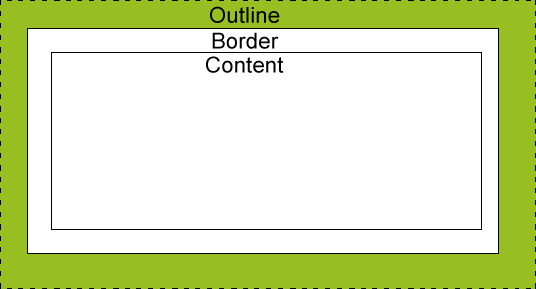 |
| http://www.w3schools.com/css/css_outline.asp |

li {
   list-style: none;
   display: block;
   float: left;
   height: 40px;
   width: 60px;
   line-height: 40px;
   text-align: center;
   vertical-align: middle;
   background: #eee;
}
Now, let's add a blue border:
li { border: 5px solid blue; }

li { outline: 5px dotted red; }

The outline is not actually a part of the box, it does not count in any way towards the width or height of a box.Which is exactly what we're seeing here. That is, while our boxes are technically sitting directly against each other (as is evident with only our blue border applied), the red OUTLINE is applied outside those boxes, and thus doesn't have any affect on the layout of the boxes themselves. Seems like that could be useful, but let's for fun add some additional styles to our boxes to further see what's going on:
li { margin-right: 5px; }

ul {background: #ccc; padding: 5px; overflow: hidden; }
I first added a grey (#ccc) background and a 5px padding to my UL, and then added a 5px right margin to my boxes. Here's the result (the first set of boxes is with only the blue border, the second is with both the blue border and the red outline applied):

Other stuff
Block vs. Inline elements
You can expect your outline to contain block or inline elements just like borders do.outline-offset
You can define a distance from the outside the borders of your element to draw the outline. For example, "outline-offset: 2px" means your outline will start an additional 2 pixels outside the edges of your element...cool. It's important to note that there is not an equivalent offset property for borders.outline-width
Presumably because outline isn't really intended as decorative functionality, or maybe because we already have borders, you can only effect the width of your outline in its entirety; that is, you can't selectively have only say a outline-top, or an outline-width of 0 5px 5px 0...border-radius
Has no effect on outline at all. Think of outline as just drawing a box around the edges of your element, regardless of how you might decorate that element.Usage ideas
Document inspection
You could add some ultra quick and easy firebug-esque element highlighting by just adding the below, which will highlight every element you hover over without breaking the document flow or layout at all.
*:hover { outline: 1px solid red; }
Wireframe view
Just change your outline selector a little, and you'd see outlines of every element on your page:
body * { outline: 1px dotted red; }
A bit heavy handed with the wildcard, but changing your selector to just an element type (e.g. div, p, a, img, etc) you could instantly see all components of that type on your page. Kinda nifty.
Inline edits
Maybe we could make edit-in-place-able elements a bit more obvious on hover by adding a nice, wide outline of the same color as your element's hovered background color.Inline form error highlighting
Similar to that last idea, we could add a nice wide outline to our form fields that have some field validation issue, thus better visually calling out the offending field(s) to the user.Others?
There seems like we could come up with lots of potential uses for this feature (e.g. maybe tabbed interfaces, which I haven't played with yet); what are your thoughts?

No comments:
Post a Comment